The best UPS for businesses
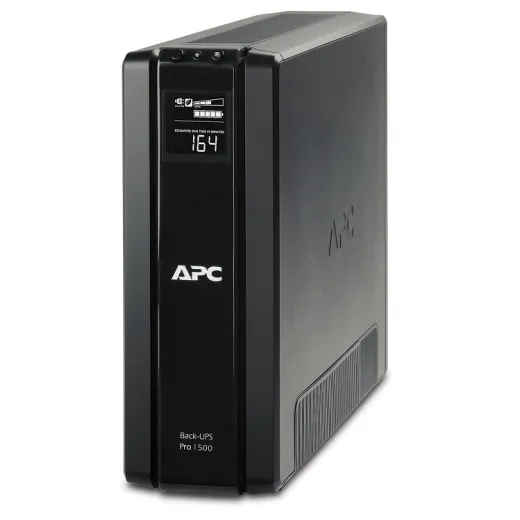
The best UPS for a company depends on the equipment it protects: for a workstation or for the network equipment in a small office, a line-interactive UPS such as the APC Back-UPS Pro 1500, recommended below, is enough; for servers and critical systems, you need a UPS with pure sine wave output or an online UPS, with automatic server shutdown.
What is an uninterruptible power supply (UPS)?
A UPS is a device that provides emergency power to anything connected to it during a power outage. Although it works much like a generator, and both systems are designed to provide backup power, with a UPS there’s no break in the power supply. A UPS provides enough backup power for you to shut down your equipment safely, avoiding damage to it and data loss. A generator may have a brief interruption before it kicks in and can then provide hours of power, while a UPS is mainly meant to protect equipment against outages and power surges. Because it runs on batteries, a UPS has limited runtime, but it remains a necessity, especially in areas with frequent power outages. You’ll find out how the two complement each other in the article on the differences between UPS units and generators.
What types of UPS are there?
UPS units are used in many fields, from industrial, manufacturing, computing and communications applications to medical and military ones, and some UPS systems are specially designed to work at high temperatures. Today, UPS devices are found wherever there are computers and servers. Uninterruptible power supplies have become indispensable especially in fields where a power outage can have serious consequences and even put lives at risk, such as hospitals.
Depending on how they work, UPS units come in three types:
- Offline (standby). The simplest and cheapest: it powers the equipment directly from the mains and switches to battery only when the power goes out. It’s suitable for a computer or a home router.
- Line-interactive. It corrects voltage fluctuations on its own, through its automatic voltage regulator (AVR), without draining the battery. It’s the usual choice for workstations, network equipment and small servers. The APC Back-UPS Pro, recommended below, belongs to this category.
- Online (double conversion). The equipment is powered through the UPS at all times, which regenerates the voltage, so switching to battery happens with no interruption at all. It’s used for servers, server rooms and critical equipment.
How do you choose the best uninterruptible power supply?
The main factor to keep in mind when choosing the best UPS system is the number of devices you want to connect to it. This determines how many outlets you need and how much power. Another factor is your budget. In short, check:
- Power. Add up the consumption in watts (W) of the equipment that will run on the UPS and choose a model with 20–30% headroom. UPS units have two ratings, apparent power in VA and active power in W, and the equipment’s consumption must fit within both.
- Runtime. How many minutes the UPS needs to last: long enough to save your work and shut down the equipment (usually 5–15 minutes) or longer, until a generator starts. Manufacturers publish runtime charts by load.
- Waveform. Modern computer and server power supplies (with active PFC) work best with a UPS that delivers a pure sine wave on battery.
- Automatic shutdown. The UPS must be able to shut down the servers on its own when the battery runs low, via a USB cable and software or, for several servers, via a network card.
- Battery. UPS batteries are replaced every 3–5 years on average. Choose a model with an easy-to-replace battery and check it regularly.
- Form factor. Tower, for the office, or rack, for the server cabinet.
Which UPS should you choose for each piece of equipment in your company?
- Workstation or office computer: a 700–1500 VA line-interactive UPS, like the one recommended below.
- Router, switch, firewall and NAS: a small line-interactive UPS, so the network and data stay available for a few minutes and the NAS shuts down properly.
- Servers and the network cabinet: a line-interactive UPS with pure sine wave output or an online UPS, in rack format, with a network card for automatic shutdown.
- Critical systems that must never go down: an online UPS, possibly redundant, plus a generator.
Our recommendation: APC Back-UPS Pro 1500
For a workstation or for the network equipment in a small office, we recommend the APC Back-UPS Pro 1500, in the version with Schuko outlets (BR1500G-GR), a line-interactive UPS. We first presented it in 2021; the model was still available in stores in 2026, but check the specifications of the version you buy on the APC by Schneider Electric website.
The APC Back-UPS Pro 1500 is a tower-style uninterruptible power supply with a battery big enough to keep most computers running when the power goes out. It doesn’t have enough energy for hours of demanding work, but it lets you keep working for a while if consumption is low, or save your work safely and shut down your computer if your workstation draws a lot of power.
An attractive look
The APC Back-UPS Pro 1500 has a mini-tower case that looks like a smaller version of a desktop computer. The finish is mostly matte black, with a glossy stripe on the front.
The overall design is fairly utilitarian, with all the outlets and ports at the back, vents on the sides and a conveniently placed display on the front, next to the few buttons, but it’s attractive enough that I wouldn’t mind leaving it on my desk if I had the room. Most people will prefer to put it under the desk, and its tall, slim shape makes that easy too.
The battery sits at the bottom of the UPS, hidden behind a sliding panel, and the connector for an extra battery is at the back, for easier access.
A clear LCD screen that shows all the information you need
The Back-UPS Pro 1500 has a small screen that shows important information such as input voltage, battery status and current load. You can see much more detailed information in the PowerChute software, but I found this small LCD screen a welcome addition.
Outlets and ports: 6 power outlets, but no USB charging ports
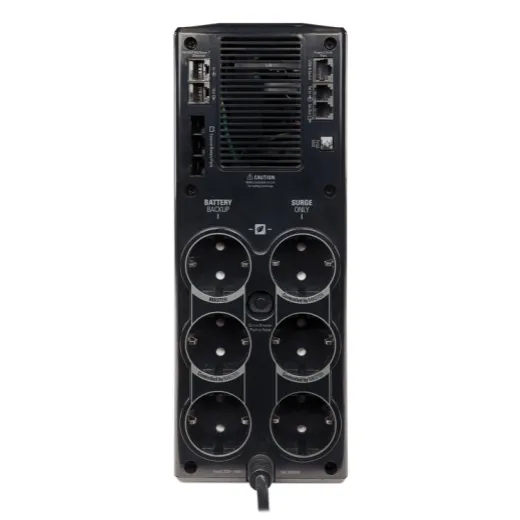
This UPS has 6 power outlets, all with surge protection. Three of them are also battery-backed, while the other three have surge protection only; some of the outlets can be controlled by a master outlet, so peripherals switch off along with the computer.
Besides the power outlets, the unit provides surge protection for the network connection. It also has a data port for connecting it to a computer, so you can use the PowerChute software, as well as a connector for an extra battery.
All the outlets and ports are at the back of the device, and the UPS has no USB charging ports or other dedicated charging ports.
The battery: enough energy for demanding applications
This is an 865 W/1500 VA UPS, but these figures show how much power the device can deliver at any given moment, not how much energy the battery stores. The battery itself is a 216 volt-ampere-hour unit, and you can replace it without shutting down your equipment.
With the default settings, the UPS can keep your computer running long enough for you to save and close the documents and programs you’re working with.
Charging speed
I found that the built-in battery needs about eight hours to charge fully. That’s not bad for a battery this size, although it takes longer than with other UPS units I’ve used.
Price: not the cheapest, but worth it for its features
It isn’t the cheapest UPS in its class, but the screen, the easy-to-replace battery and the automatic shutdown software justify the difference. The price varies a lot from one store to another, so it’s worth comparing before you buy.
IT services for companies: tell me more →
RezolvIT handles IT maintenance for companies’ computers, servers, networks and printers, in Bucharest and throughout Romania. We start with a free IT audit, which also gives you the exact price.
Tell us what’s slowing you down. We’ll call you.
It takes 30 seconds, and a specialist will call you back within 2 business hours.
- free IT & AI audit, no obligation
- a report with risks and concrete recommendations
- a clear offer, with a fixed monthly plan
Prefer the phone? 031 432 8681