Have you ever wondered how email works?

Email is indispensable for any company today. It’s probably the most widely used way of communicating with partners or with your team.
But have you ever wondered how email works?
Let’s start with the basics, like at school. Email stands for electronic mail.
The main protocols for receiving email are IMAP and POP, while SMTP is the protocol for sending it. Microsoft Exchange uses its own protocol, called MAPI, to sync messages with devices.
The IMAP protocol:
The IMAP protocol, or Internet Message Access Protocol, lets you read the messages sent to you directly from the server. What’s more, it syncs with the server in real time.
If, for example, you delete an email from your Inbox, it will automatically disappear from the email server too. Likewise, if an email is read on one device, it will show as read on every device where the address is set up.
The POP protocol:
POP, or Post Office Protocol, is another protocol for receiving email. The major difference compared with IMAP is that it downloads all messages locally, to your device, and then deletes from the server whatever it has downloaded (unless the app is set to keep a copy on the server). What’s more, sent messages are saved only on the device they were sent from, not on the server.
If you mark an email as read on a device where the account is set up with POP, it will still appear as unread on the other devices that managed to download it.
The MAPI protocol:
MAPI, or Messaging Application Programming Interface, is the protocol used by Microsoft Exchange servers to receive and send email.
It behaves similarly to the IMAP protocol, with messages fully synced with the server.
In addition, MAPI also syncs the contact list and the calendar. In Microsoft 365 (Exchange Online), Outlook connects to the server through the modern version of the protocol, MAPI over HTTP.
The SMTP protocol:
SMTP, or Simple Mail Transfer Protocol, is the protocol used to send email between the source server and the destination server.
There’s an additional SMTP protocol, called SUBMISSION, which is used only to authenticate devices on the source server when they send messages (usually on port 587).
Okay, okay, but how does email work?
How email works
The message you send is passed on through the SMTP SUBMISSION service. This, in turn, queries the DNS server, which is responsible for “identifying the destination server”. Then, after this identification, the message is sent by the SMTP service to the destination server.
From there, the message is passed on by the IMAP receiving protocol and can be read by the user.
A simple diagram:
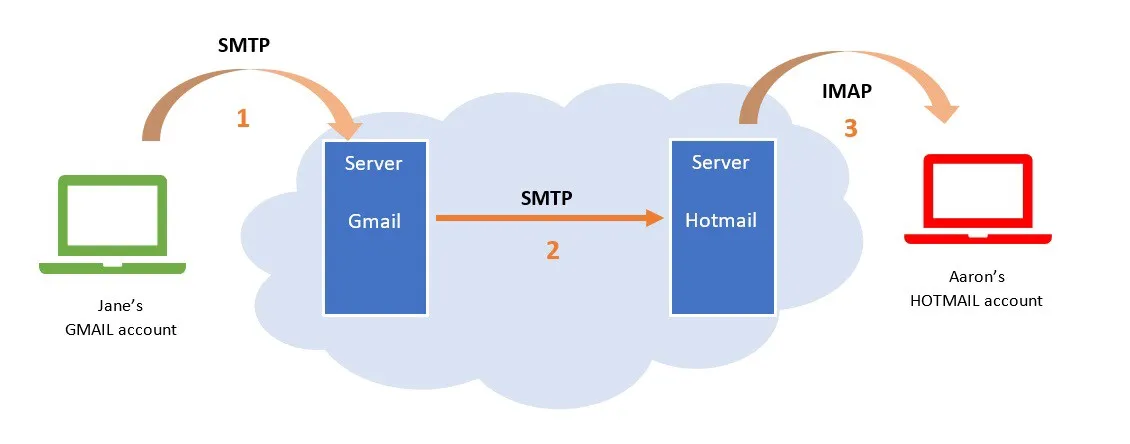
Is your head spinning yet?
An email server is a physical or virtual computer that runs the protocols for receiving and sending email.
The DNS service is the protocol that handles discovering the destination server, to help the SMTP protocol pass the message on.
Okay, okay, but how does email work?
First of all, the user fills in the destination address, the subject and the body of the message, then presses the Send button. Next, the message reaches the SMTP protocol through the MTA (Mail Transfer Agent).
The SMTP protocol calls the DNS server, which runs a query to find the MTA of the destination server. This is set in the DNS zone as an MX (Mail Exchanger) record.
Once the “destination address is resolved”, the message goes back to the SMTP protocol, which forwards it to the destination server.
When they receive a message from outside over SMTP, most servers pass it through several internal filters, antivirus and antispam, before delivering it to the recipient’s mailbox.
If the server identifies a virus or content considered SPAM, the message is rejected or quarantined, and an error is returned to the sender.
Finally, the scanned message is handed over by the destination server, and the final recipient downloads it to their device via the IMAP or POP protocol.
Which is better for a company: IMAP, POP or Exchange?
For a company, the right choice is almost always IMAP or, better still, Exchange (for example through Microsoft 365), because messages stay on the server and look the same on your computer, laptop and phone. POP now only suits a mailbox read from a single device, and messages downloaded this way are lost along with the computer if they aren’t backed up.
Exchange adds shared calendars and contacts, which are useful in a team. In addition, since October 2022, Microsoft 365 no longer accepts POP or IMAP connections with just a username and password (Basic Authentication): email apps have to use modern authentication. The full comparison is in the article POP3, IMAP or Exchange: which mail protocol is right for your company.
What are SPF, DKIM and DMARC?
SPF, DKIM and DMARC are DNS records that show destination servers that a message really comes from the company’s domain and not from someone pretending to be the company.
- SPF says which servers are allowed to send email on behalf of the domain.
- DKIM adds a digital signature to each message, which the destination server verifies.
- DMARC says what the destination server should do with messages that fail the checks (let them through, move them to spam or reject them) and sends reports to the company.
Since February 2024, Gmail has required SPF or DKIM from all senders, and all three from those who send more than 5,000 messages a day. Since May 2025, Microsoft has required the same of bulk senders to Outlook.com and Hotmail. For a company, a correct setup means fewer legitimate messages landing in spam and fewer fake emails sent in its name. To learn how to recognize a fake message, see the article on how to check if an email is spam.
RezolvIT is an IT outsourcing company that places great value on following security standards and uses innovative solutions to strengthen the security of the companies it works with.
Tell us what’s slowing you down. We’ll call you.
It takes 30 seconds, and a specialist will call you back within 2 business hours.
- free IT & AI audit, no obligation
- a report with risks and concrete recommendations
- a clear offer, with a fixed monthly plan
Prefer the phone? 031 432 8681