How to check if an email is spam and how to avoid hackers’ scam attempts
What are SPAM messages?
The correct definition of spam is unsolicited email. Spam, in turn, can be split into several categories: phishing, smishing, “man-in-the-middle” attacks and so on.
Spam stands out for being aggressive and repetitive, and for not giving you the option to unsubscribe from such messages.
The method is also often used to collect email addresses, which are then sold on so that more spam can be sent to them, such as commercial messages and more.
The legal details on spam are set out in Romania’s Law no. 506 of November 17, 2004 on the processing of personal data and the protection of privacy in the electronic communications sector. Since May 2018, the General Data Protection Regulation (GDPR) also applies, protecting personal data, including email addresses.
What are PHISHING messages?
The term phishing (pronounced “fishing”) refers to fraud: a form of criminal activity that consists of obtaining confidential data, such as login details for banking or e-commerce apps or a user’s card information, which the attacker asks for through a web page that looks like the original (a clone).
Most of the time, users are encouraged to hand over this information either because they have supposedly won prizes or because their original data has supposedly been lost.
What are SMISHING messages?
Smishing means using SMS messages to lure victims into actions similar to phishing. The texts may ask you to click a malicious link or disclose sensitive information. Smishing messages can also be sent through apps such as WhatsApp or Facebook Messenger, among others.
IT services for companies: tell me more →
So how can we protect ourselves from these scams?
Below are a few examples of deceptive spam emails.
Example 1
Hello,
I have been following you for a few months.
In fact, you were infected with malicious software through an adult site that you visited.
If you are not familiar with this, I will explain it.
The Trojan virus gives me access and complete control on a computer or on other device.
This means that I can see everything on the screen and I turn on the camera and microphone, but you don’t know this.
Also, I had access to all your contacts.
Why did the antivirus program not detect the malicious code?
Answer: I have a trojan chauffeur, I update their signatures every four hours, so that the antivirus is silent.
I made a video that shows how to satisfy you in the left half of the screen and in the right half you see the video that you watched.
With the help of a button, I can send this video to all your email and social network contacts.
To avoid this, transfer the amount of 800 EURO to my jewelry address (if you don’t know how to buy Bitquin and send it, please search Google “Buy Bitcoin”).
Bitcoin Address: ***
After receiving the payment, I will remove the video and you will not hear from me anymore.
I give you 24 hours to pay.
Don’t worry, I have a notification that reads this letter and the timer works when you read this letter.
Sending complaints to someone is not significant, because this email cannot be tracked as Bitcoin type address.
I don’t make mistakes
If I find that I sent a report or sent this message to other people, the video will be distributed immediately.
All the best!
Example 2
Good day!
As you noticed, I sent you an email from your account.
This means that I have full access to your account.
I am watching you for a few months now.
The fact is that you were infected with malware through an adult site that you visited.
If you are not familiar with this, I will explain you.
The Trojan Virus gives me full access and control over a computer or another device.
That means I can see everything on your screen, you turn on the camera and microphone, but you don’t know about it.
I also have access to all your contacts and to all your correspondence.
Why your antivirus did not detect malware?
Answer: my malware uses the driver, I update its signatures every 4 hours, so that the antivirus was silent.
I made a video showing how you masturbate in the left half of the screen, and in the right half you see the video you were watching at that moment.
With one click of the mouse, I can send this video to all your emails and contacts on social networks.
I can also post access to all your email correspondence and the messengers that you use.
If you want to prevent this, transfer the amount of 950€ to my bitcoin address (if you don’t know how to do this, write to Google: “Buy Bitcoin”).
My bitcoin address (BTC wallet) is: ***
After receiving the payment, I will delete the video and you will never hear me again
I give you 48 hours of payment.
I have a notification that reads this letter and the timer will work when you will see this letter.
Filing a complaint somewhere makes no sense, because this email cannot be tracked like my bitcoin address.
I am not wrong.
If I find that you shared this message with someone else, the video will be distributed immediately.
Greetings!
What do you notice about these two examples, originally written in Romanian?
First of all, they contain a lot of spelling mistakes. Second, they try to intimidate the person reading the email. But the message is sent in bulk, to millions of addresses, and the attacker has no video, so you have nothing to worry about: you can ignore it and delete it. These emails are also known as sextortion emails (sexual blackmail emails), and they’re just one more of the many kinds of spam.
Be careful, though: spelling mistakes are no longer a reliable sign. Scam messages are increasingly written correctly, with the help of machine translation and artificial intelligence.
How do we deal with spam emails like these?
Our first piece of advice is don’t panic. You haven’t been the victim of a hacker. This type of email has been preying on naive people for a very long time and targets people all over the world.
Our next piece of advice is don’t pay the so-called hacker anything at all, no matter what the email says. If you pay, all you do is encourage the attackers to keep up their phishing spam.
What can be truly alarming about this kind of attack is that, at the start of the message, the hacker writes a password you use or have used in the past. If you’re wondering how they got hold of that password, the explanation is simple.
The people behind the attack combined several databases of stolen email addresses and passwords, then sent one of the messages above to millions of people, hoping the recipients would panic and pay the amount demanded. What’s more, some recipients even tried to negotiate smaller amounts with the attackers. You can check whether your email address has appeared in such a breach on the Have I Been Pwned website.
Don’t reply to the hackers! All you do is confirm that there’s a real person behind that email address, one who is probably scared.
Change the password that appears in the message, on every account where you’ve used it. Use long passwords of at least 15 characters (for example, an easy-to-remember phrase), and don’t use the same password for several accounts (email, social networks, banking apps and so on). A password manager helps you remember them, and two-step verification (MFA) protects your account even if the password has been stolen. See also the basic rules for creating secure passwords.
Cover your webcam! For extra comfort and safety, cover your webcam with a piece of thicker paper, colored or white, if it doesn’t already have a built-in cover.
Report any suspicious email to the IT team! Depending on the type of server and the antispam solution used, some spam or malicious emails can be blocked at the server level. If your company uses Microsoft 365, Outlook also has a button for reporting phishing and spam.
How can we check for ourselves if an email is malicious?
If you use classic Outlook, open the email, then select Properties from the File tab. You should see a window like the one below. In the new Outlook and in Outlook on the web, the same information is available from the message’s three-dot menu, under View > View message details, and in Gmail under Show original.
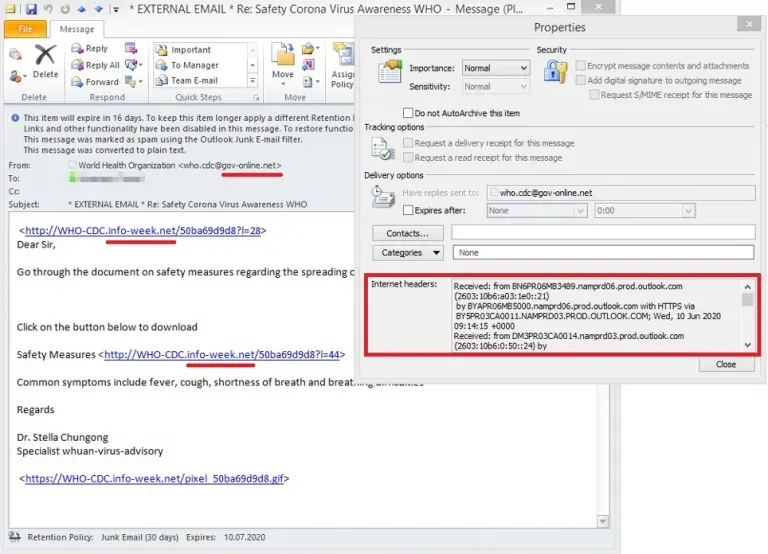
What’s suspicious about this email, which appears to come from a legitimate site, is the domain it was sent from: gov-online**.net**.
Below is another example of an email that looks legitimate, from a Romanian domain registrar. We displayed it as text in webmail precisely so we could see the malicious links.
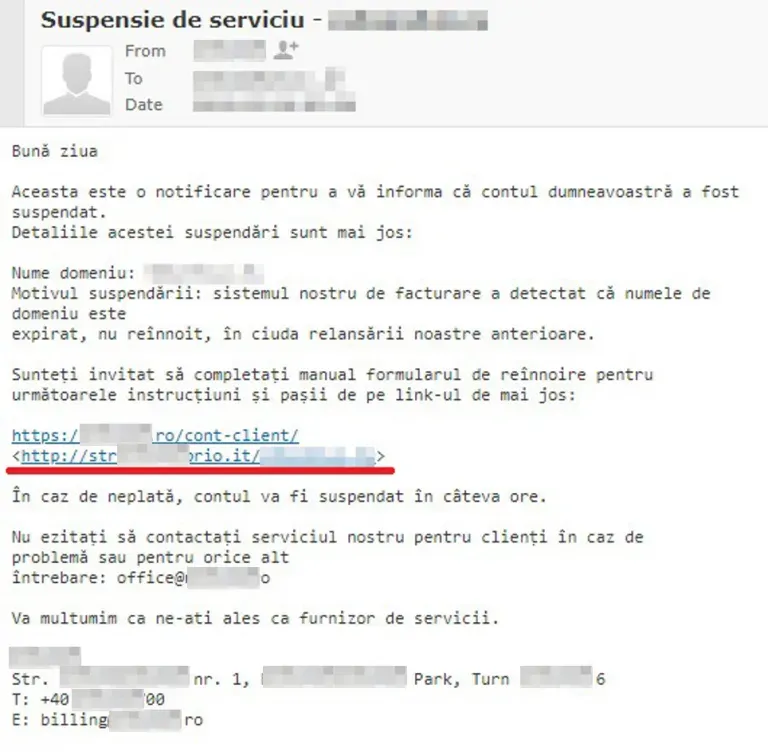
We can check whether the domain the email came from is malicious, or leads to a malicious page, using the VirusTotal website. Choose the URL option, paste the link (without opening it) and wait for the results. Note: whatever you submit to VirusTotal is shared with security companies, so don’t upload confidential documents there.
Don’t click every link you receive by email, even if it seems to come from someone you know. If you hold the cursor over the link (hover) without clicking, you’ll see the real address it leads to and can tell whether the link is what it appears to be. On a phone, press and hold the link without opening it.
Backup as a Service: tell me more →
Here are a few hypothetical examples:
- Mariana from accounting sends you an email with a Word file named payslip_monthXX.docx. What do you do? Do you open the attachment from Mariana? You know her, after all! Except… this is the first month you’ve received your “payslip” by email.
- Your colleague Virgiliu from IT sends you an email with the subject “You won’t believe this”, and the body of the email contains nothing but a link. What do you do? Do you click the link or not? It’s Virgiliu from IT; would he send something malicious by email to <undisclosed-recipients>?
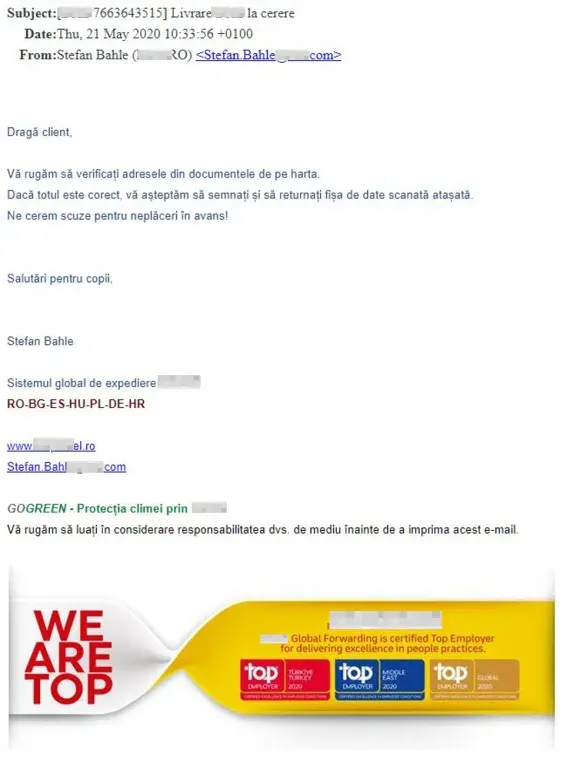
- You receive an email from Romanian Post (Poșta Română), DHL, GLS or another well-known courier company, asking you to check some documents in an attached archive. Do you open them? Are you actually expecting a parcel from DHL, Romanian Post or the like?
For case 1, we recommend contacting Mariana, either by phone or in a new email, to ask whether she sent you an email with a payslip.
For case 2, we recommend doing the same as in point 1.
For case 3, we recommend deleting and ignoring the message after reporting it to the IT team. The same kind of message now often arrives by text too, with a link to pay a “delivery fee” or a “customs fee”.
What has changed about phishing messages in recent years?
Phishing messages are harder to recognize today: they’re written correctly, they appear to come from real companies or colleagues, and they arrive through other channels besides email. The most common forms:
- fake login pages for Microsoft 365 or Google that ask for your password and your two-step verification code;
- QR codes in emails or in attached PDFs that lead to the same fake pages (this attack is also called “quishing”);
- messages that appear to come from the company’s director asking for an urgent payment or a change to a supplier’s bank account (CEO fraud);
- text messages and WhatsApp messages about parcels, fees, blocked bank accounts or prizes.
What helps: two-step verification on all important accounts (preferably with an app or a security key, not by SMS), email filtering at the server level, correct configuration of the company’s domain (SPF, DKIM and DMARC) and regular employee training. We’ve written separately about unwanted messages sent by real companies: how and where to unsubscribe from spam messages.
What should you do if you clicked the link or entered your password?
Change that account’s password immediately, from another device, and let the IT team know. The faster you react, the less time the attacker has to use your data.
- Change the password and log out of all other devices from the account’s security settings.
- Check two-step verification: turn it on if it wasn’t enabled, and delete any methods you don’t recognize.
- If you opened an attachment, disconnect the computer from the network and let the IT team check it.
- If you entered your card details, call your bank immediately, on the number on the back of the card, and ask them to block it.
- Report the attempt to the National Cyber Security Directorate (DNSC), Romania’s cybersecurity authority, by calling 1911 or on the DNSC incident reporting platform. If you lost money, also file a complaint with the police.
For companies, the NIS2 directive requires significant incidents to be reported to the authority within 24 hours at most; in Romania, under GEO 155/2024 (the Romanian law transposing NIS2), that authority is DNSC.
We hope you find the advice above useful. If you want us to protect your company from attacks like these, see our IT security services or request a free IT audit.
Kind regards, the RezolvIT team
Tell us what’s slowing you down. We’ll call you.
It takes 30 seconds, and a specialist will call you back within 2 business hours.
- free IT & AI audit, no obligation
- a report with risks and concrete recommendations
- a clear offer, with a fixed monthly plan
Prefer the phone? 031 432 8681